Description
Game Introduction
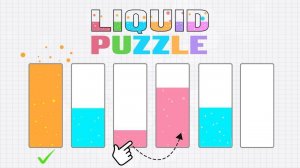
Color Sort Puzzle is a logic-based puzzle game where players sort layers of colored liquids into separate glasses. Each glass starts with a mix of colors, and the goal is to pour the liquids so that each glass contains only one uniform color. The game begins with simple puzzles featuring few colors and glasses, gradually introducing more complexity as players progress. Its vibrant graphics and intuitive mechanics make it accessible to puzzle enthusiasts of all skill levels. Designed to be relaxing and pressure-free, the game allows players to solve puzzles at their own pace, offering a satisfying mental workout without time constraints or stress.
How to Play
Players typically tap on a glass to select the colored liquid from its top layer, then tap on another glass to pour the liquid into it. The pour is only allowed if the target glass has enough empty space and if the color of the liquid being poured matches the color already on top of the target glass. If the colors do not match, the pour is blocked. Players must plan their moves carefully to avoid getting stuck. The game provides undo and hint options to help when needed. Each level presents a new puzzle to solve, encouraging strategic thinking and patience.
Game Features
Key features of Color Sort Puzzle include simple one-touch controls that are easy to learn. The game offers hundreds of unique and challenging levels to keep players engaged. Its vibrant and friendly graphics create a relaxing atmosphere. The gameplay is suitable for all ages and has no time limits or pressure, allowing players to play at their own pace. Helpful hints and undo buttons are available to assist with difficult puzzles, ensuring a frustration-free experience.
Tips for Success
To succeed in Color Sort Puzzle, focus on planning your moves ahead. Try to free up glasses by moving matching colors together. Use the undo feature if you make a mistake, and don't hesitate to use hints when you feel stuck. Practice regularly to improve your sorting speed and strategy. Stay patient and enjoy the calming process of solving each puzzle.